Managing Helm Charts as Dependencies, Not `-f values.yaml`
Introduction
I wanted to add Chatwoot to my homelab, and I
run everything there through GitOps with ArgoCD - a change is a commit, not
a command I typed once from my laptop. Chatwoot ships an official Helm
chart, so the obvious move was helm repo add, then helm install with my
own values.yaml on top. That gets it running, but re-running helm upgrade by hand every time a value changes isn’t really GitOps, and if
Chatwoot needed something the chart doesn’t ship - a NetworkPolicy, say -
there’d be nowhere to put it except a second, unrelated manifest. That’s
what pushed me toward a different pattern: instead of overriding an upstream
chart’s values from the outside, make it a dependency of your own chart.
Chatwoot is just the example - the pattern applies to any chart you’d
otherwise be installing straight from someone else’s repo.
The Usual Way
❯ helm repo add chatwoot https://chatwoot.github.io/charts
❯ helm install chatwoot chatwoot/chatwoot -n chatwoot -f values.yaml
This works, but the chart version isn’t pinned anywhere reviewable - it’s
whatever --version you typed, or whatever helm repo update happened to
resolve to, sitting only in shell history. And values.yaml only makes
sense next to that version; nothing ties the two together.
Depend on It Instead
Make a small chart of your own, and declare the upstream chart as a dependency rather than installing it directly:
# Chart.yaml
apiVersion: v2
name: chatwoot
type: application
version: 0.1.0

dependencies:
  - name: chatwoot
    version: 2.0.24
repository: https://chatwoot.github.io/charts❯ helm dependency build
Saving 1 chartsThat resolves the dependency, writes the exact version and a digest to
Chart.lock, and downloads the packaged chart into
charts/chatwoot-2.0.24.tgz. A version bump is now editing one number in
Chart.yaml and re-running helm dependency build - a real diff on
Chart.lock, the same way a go.sum or package-lock.json pins a library
version, instead of a fact that only lives in shell history. And because
the chart and its dependency versions are just files, they deploy the same
way everything else in a GitOps repo does - ArgoCD (or Flux, or helm upgrade in CI) reconciles the directory, rather than someone needing to
remember to re-run a command.
Your chart, not the upstream one, is what gets installed - the upstream chart just hangs off it as a dependency.
Renovate Bumps It For You
The other benefit of turning a chart version into a plain field in
Chart.yaml is that it stops being something only a human remembers to
check. Renovate’s helmv3 manager reads
dependencies[].version the same way it reads a go.mod or
package.json entry, checks the chart repository’s index for anything
newer, and opens a PR:
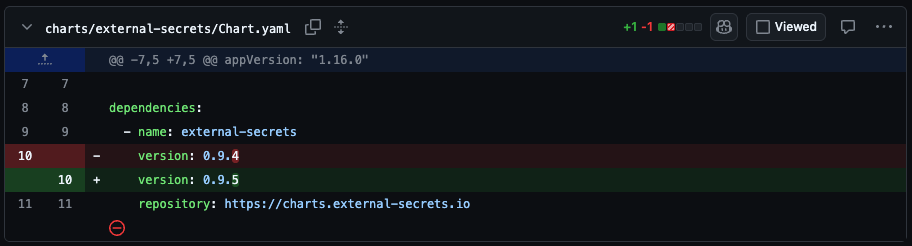
That’s a genuine PR from this same repo, just a different chart
(external-secrets) - same pattern as the Chatwoot one, one line changed,
repository: untouched. Renovate leaves its usual summary alongside it:
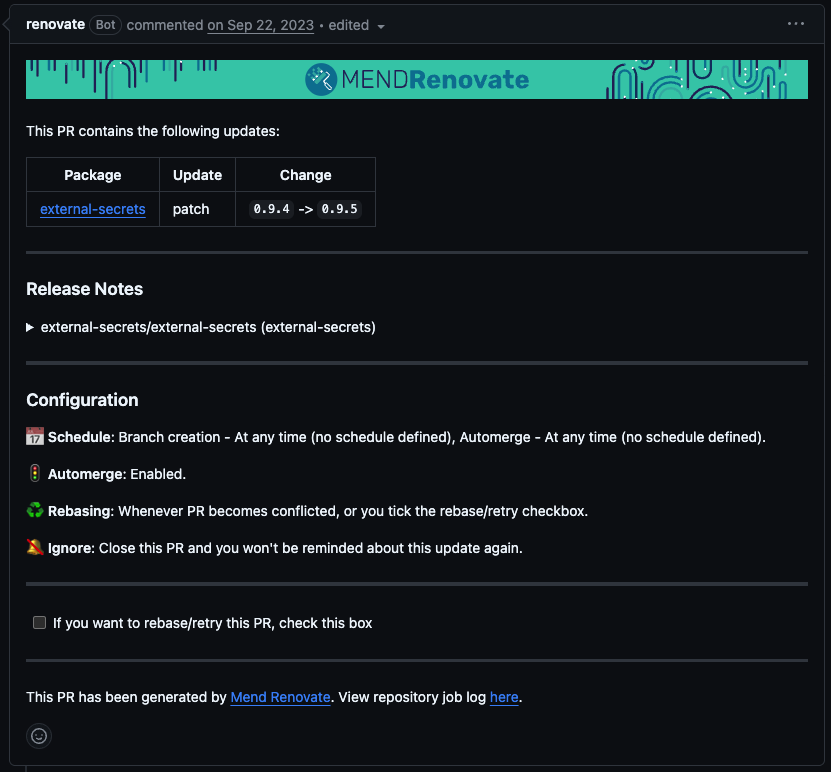
It also keeps Chart.lock in sync with whatever it bumps, so the digest
never goes stale next to the version. The one thing it won’t do on its own
is refresh a vendored charts/*.tgz - for that you need
postUpdateOptions: ["helmUpdateSubChartArchives"] in Renovate’s config, so
the archive ArgoCD (or whatever renders the chart) actually reads gets
updated in the same PR as the version bump. Either way, keeping a chart
current goes from “remember to check upstream” to “review a PR” - the same
place every other dependency bump in the repo already shows up.
Values, Same Shape as Before
Whatever you’d have passed with -f values.yaml against the upstream chart
directly still works exactly the same - it just sits under the dependency’s
name instead of the top level:
# values.yaml
chatwoot:
  ingress:
    enabled: true
    hosts:
      - host: chatwoot.example.com
  postgresql:
    enabled: false
    postgresqlHost: postgres.postgres.svc.cluster.local
Nothing about the values themselves changes - it’s still Chatwoot’s own
values.schema.json underneath - only the namespacing, so your chart could
in principle depend on more than one thing.
Room for Your Own Resources
This is the part a bare helm install genuinely can’t give you: your
chart’s own templates/ directory sits right next to the dependency and
contributes to the same release. The NetworkPolicy I wanted for Chatwoot
is just another template file, not a manifest applied on the side:
# templates/networkpolicy.yaml
apiVersion: networking.k8s.io/v1
kind: NetworkPolicy
metadata:
  name: chatwoot-egress
spec:
  podSelector: {}
  policyTypes: [Egress]
  egress:
    - to:
        - namespaceSelector:
            matchLabels:
              kubernetes.io/metadata.name: postgres
      ports:
        - protocol: TCP
          port: 5432
helm template shows it rendering as one release, not two things
pretending to be related:
❯ helm template chatwoot . -f values.yaml | grep -E '^kind:' | sort | uniq -c
   1 ConfigMap
   2 Deployment
   1 NetworkPolicy
   1 Secret
   4 Service
   1 StatefulSet
Conclusion
None of this changes what the upstream chart takes as input - same chart,
same options, same maintainers. What changes is where things live: a pinned
version in Chart.lock, values in the same shape you’d have passed with
-f, and a place for whatever the upstream chart doesn’t cover. For a
GitOps setup like mine, that’s the whole point - helm upgrade isn’t a
command I run anymore, it’s just what ArgoCD does with the directory every
time I push a commit.