Talos OS: Securing an Exposed App with Cloudflare Zero Trust
Introduction
In the previous post
I got an app on my Talos cluster reachable from the internet through
cloudflared. That was also the problem it left behind: anyone with the
URL could hit it, no login, nothing. Before I put anything real behind a
tunnel, it needs to actually require someone to be who they say they are.
That’s Cloudflare Access, and this post is wiring it up.
Why Zero Trust Instead of Auth in the App
The easy option would be adding a login page to the app itself. Cloudflare Access does the check in front of the tunnel instead, before the request ever reaches the cluster - the app doesn’t need to know anything about authentication at all. The “zero trust” part is the model behind it: access is decided by who you are, not by whether you’re on my LAN or a VPN. Nothing gets a pass just because of where the request came from.
Choosing an Identity Provider
Cloudflare Access supports a handful of identity providers - Google, GitHub, one-time PIN over email, generic OIDC/SAML. I picked Okta: simpler to wire up as a single IdP than standing up something else just for a one-person homelab, and it’s the one I’m managing the policy against for every app that needs it.
Terraform: The Access Application
Each protected hostname gets a cloudflare_access_application plus a
policy that only lets a specific Okta group through:
resource "cloudflare_access_application" "this" {
  zone_id                   = data.cloudflare_zones.this.zones[0].id
  name                      = var.hostname
  domain                    = "${var.hostname}.${var.domain}"
  allowed_idps              = [data.cloudflare_access_identity_provider.okta.id]
  type                      = "self_hosted"
  session_duration          = "730h"   # ~30 days
  auto_redirect_to_identity = true
}

resource "cloudflare_access_policy" "this" {
  application_id = cloudflare_access_application.this.id
  zone_id        = data.cloudflare_zones.this.zones[0].id
  name           = "Okta Groups"
  precedence     = "1"
  decision       = "allow"

  include {
    okta {
      name                 = var.okta_groups
      identity_provider_id = data.cloudflare_access_identity_provider.okta.id
    }
  }
}
auto_redirect_to_identity skips Cloudflare’s own IdP picker and sends
visitors straight to Okta. session_duration controls how long that login
sticks before Access makes them go through Okta again - long enough that I
don’t re-authenticate on every visit, short enough that it isn’t
effectively permanent.
❯ terraform apply
...
  # cloudflare_access_application.this will be created
  # cloudflare_access_policy.this will be created
Plan: 2 to add, 0 to change, 0 to destroy.

cloudflare_access_application.this: Creating...
cloudflare_access_policy.this: Creating...
Apply complete! Resources: 2 added, 0 changed, 0 destroyed.
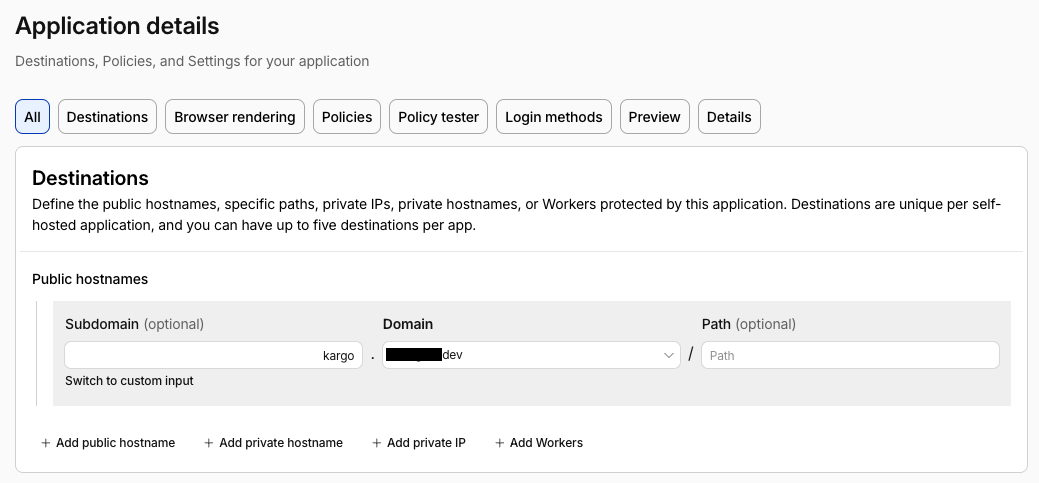
That’s what shows up in the dashboard afterward - the Destinations tab on
one of my actual protected apps (not nginx-demo, but the same shape:
one public hostname per application):
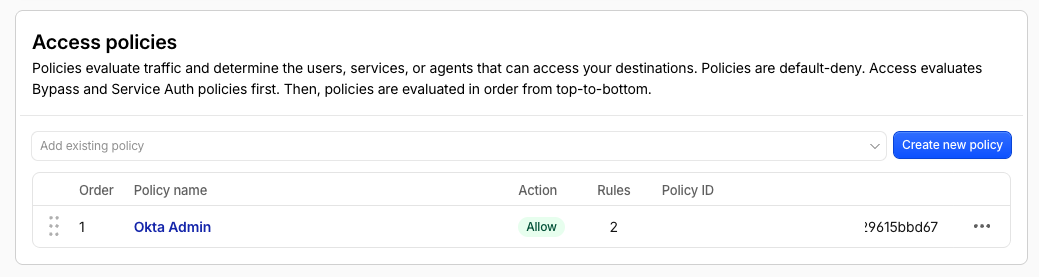
And the Access policy it creates - on this app the policy happens to be named “Okta Admin” rather than “Okta Groups”, but it’s the same default-deny-plus-an-Okta-group pattern from the Terraform above:
Hitting nginx.example.com in a browser now bounces through Okta before
it ever reaches nginx, and only members of the group in okta_groups get
past the login.
What About Scripts and curl?
An Okta redirect is fine for a browser, useless for anything scripted -
curl can’t click through a login page. Cloudflare Access covers that with
service tokens: a separate policy, opt-in per application, that doesn’t
touch Okta at all:
resource "cloudflare_access_policy" "service_token" {
  count = var.enable_service_token ? 1 : 0

  application_id = cloudflare_access_application.this.id
  zone_id        = data.cloudflare_zones.this.zones[0].id
  name           = "Service Token"
  precedence     = "3"
  decision       = "non_identity"

  include {
    any_valid_service_token = true
  }
}
With that policy in place, a request carrying a valid service token’s client ID and secret gets through without ever seeing the Okta redirect:
❯ curl -H "CF-Access-Client-Id: <client-id>.access" \
  -H "CF-Access-Client-Secret: <client-secret>" \
  https://nginx.example.com
It’s a separate credential from anyone’s Okta login, so I mint one per script or automation that needs in, and it can be revoked on its own without touching anyone’s actual account.
Conclusion
The cluster from the first post, storage from the second, a database in the third, and now anything exposed through the fourth post’s tunnel requires either an Okta login or a service token to reach it at all - no more anonymous public access to anything sitting behind Cloudflare on this homelab. Four posts to get here, and the three mini PCs that used to just sit on my desk now run a cluster where nothing gets in without proving who it is.